Universal PDF-to-EPUB Converter

Reflow any PDF into beautiful, flowable EPUBs.

Powered by AI OCR for layout recognition and math formula extraction, with a built-in visual editor to proofread text, remove block noise, adjust TOCs, and customize typography before reading on Kindle.

AI Layout OCRFormula ExtractionVisual Text EditorCredits or BYOK

Reading Experience

Convert difficult PDFs into flowable EPUBs

Transform multi-column papers, dense textbooks, and formulas into smooth, reflowable EPUB text for all your devices.

High-accuracy PDF reflow

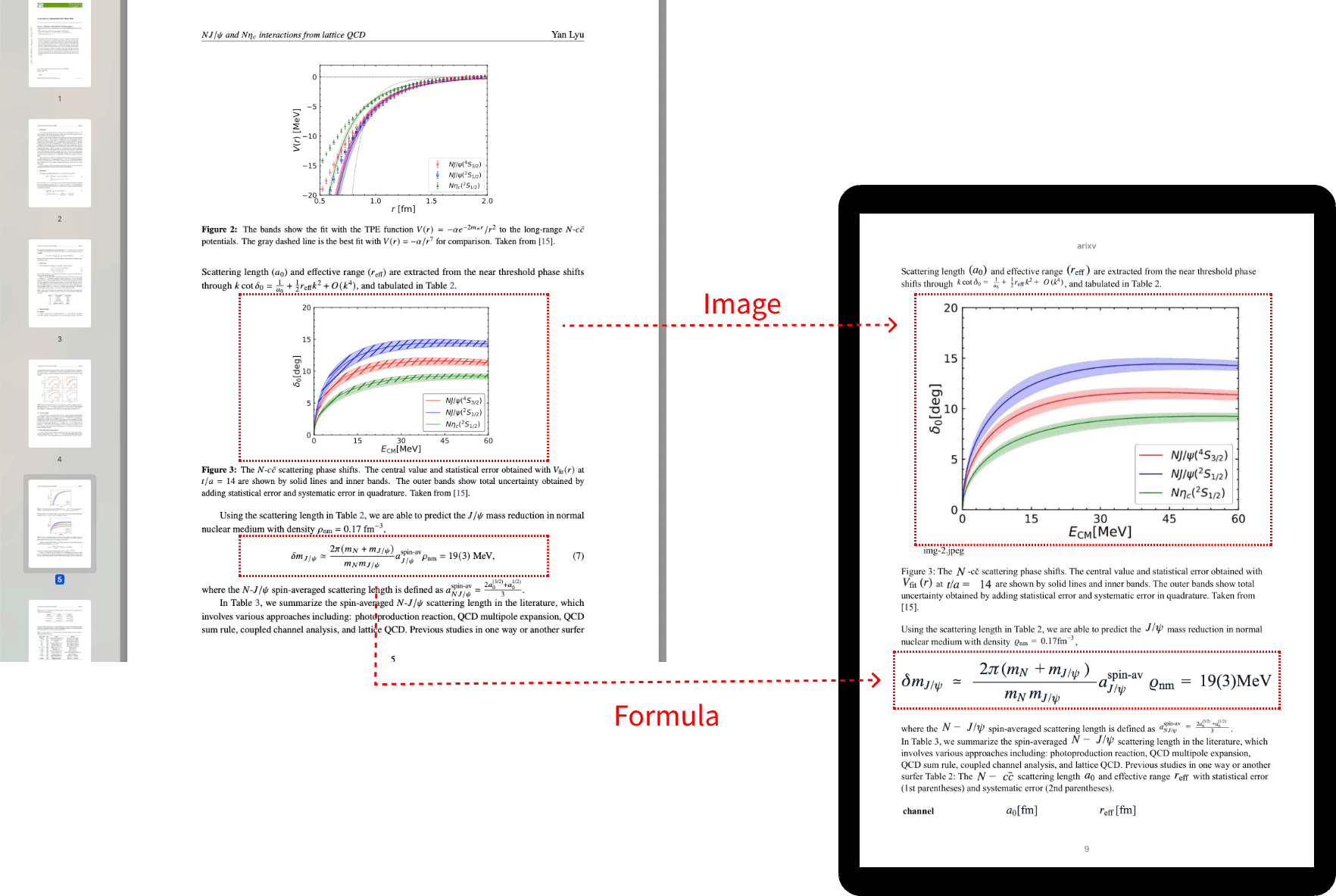
ReflowablePDF analyzes visual layouts to rebuild clean document structure instead of dumping broken text strings.

  • Preserves document hierarchy, headings, and typography
  • Renders math formulas and complex technical symbols accurately
  • Flexible processing with Managed Credits or BYOK Mistral mode
  • Outputs high-quality EPUB for e-readers, Kindle, iPad, and mobile reading apps
PDF to EPUB conversion preview

Click preview image to expand

The Last-Mile Solution

Integrated Desktop Editor for 100% Flawless EPUBs

AI OCR handles complex layouts and math formulas, but standard converters leave minor errors behind. ReflowablePDF gives you an in-app desktop editor to fine-tune text and structure before exporting.

Visual Text Proofreading

Directly edit text blocks on the preview canvas to fix OCR typos, missing punctuation, or minor misreadings in seconds.

Noise Cleanup & Exclusion

Click to remove unwanted image noise or misplaced elements. Undo deletions anytime or exclude specific pages from export.

Custom TOC & Hierarchy

Promote or demote chapter headings (H1/H2/H3), search text to insert new table of content nodes, and keep your eBook organized.

Typography & Cover Controls

Select your preferred cover image, toggle Serif or Sans fonts, and fine-tune font size percentage and line height for e-readers.

No complex third-party tools required

Forget exporting broken HTML into Sigil or Calibre. ReflowablePDF combines AI OCR extraction with an instant proofreading workflow so you export publication-ready EPUBs directly.

Get Desktop App

Core Features

Built for PDF reflow, not plain text extraction

Every feature is calibrated to produce comfortable, typographically sound reading on electronic ink displays.

Reflow fixed-layout PDFs

Turn cramped PDF pages into responsive EPUB chapters that flow naturally on Kindle and mobile screens.

Formula-aware conversion

Detect and render math formulas so academic and technical PDFs remain readable without broken equations.

Integrated Proofreading Editor

Proofread text, remove block noise, manage TOC headings, and customize cover art before final EPUB export.

Credits or BYOK mode

Use hosted OCR credits for convenience, or plug in your own Mistral API key for direct model processing.

E-reader first output

Generate EPUB files engineered for real reading: adjustable font sizes, clean chapter breaks, and device-friendly layout across Kindle, Kobo, iPad, and e-ink displays.

Migration-ready

Existing PDF credits migrate seamlessly from the legacy any2ebook flow into the dedicated ReflowablePDF app.

Transparent Plans

Simple, pay-as-you-go pricing

Start with a representative preview, then choose managed processing or your own AI key.

No recurring subscription. Managed credits never expire.

Free Preview

Upcoming
$0

One 30-page device preview

  • Select a representative set of pages
  • Only selected preview pages are uploaded
  • Includes sample EPUB export without watermark
Most Popular

Managed Credits

Pay as you go
$3

per 200 pages · $0.015 per page

  • Hosted OCR without managing model keys
  • Checkout rounds up to 200-page units
  • Credits never expire

Pro + BYOK

Planned
$29.99

introductory one-time license

  • Use your own Mistral API key
  • No platform credits consumed for BYOK
  • Full editor workflow included

Download ReflowablePDF

Free to install on macOS, Windows, and Linux. Choose your platform below to get the right installer or Linux setup command.

Windows installer

Download the latest `.exe` installer, then run the setup wizard.

Download for Windows

Need help moving from Any2ebook PDF credits? Read the migration guide

FAQ

Frequently Asked Questions

Everything you need to know about formats, credits, BYOK, and migration.

What does ReflowablePDF convert?

How do credits work?

Will I be able to use my own AI token?

What happens to old any2ebook PDF credits?

Does ReflowablePDF include browser tabs or URL conversion?